
Yes. Every Maker must hold an active LibDib Membership for their products to be distributed through LibDib. One Membership covers every market LibDib serves, including new markets that launch after you join, so you never need a separate Membership per state.
Why is a Membership required?
LibDib is a licensed wholesale distributor operating within the three-tier system. Your Membership is what keeps your account active in that distribution network, so LibDib can purchase, invoice and deliver your products to licensed Buyers.
An active Membership gives you:
- Distribution through LibDib in every market where your products are approved and compliant
- Visibility to LibDib's network of licensed retailers, restaurants and bars
- Access to LibDib's platform tools for managing offerings, pricing and orders
- Support from the LibDib Team, with added services on Silver and Gold
Without an active Membership, your offerings are not available for distribution through LibDib.
One Membership covers every LibDib marketYou only need one Membership, no matter how many markets you distribute in. Your Membership applies to all available LibDib markets, not to a single state.
New markets are included automatically. When LibDib launches distribution in a new market after you join, your existing Membership already covers it. There is no new Membership to purchase and no change to your Membership fee.
To begin distribution in any market, including a newly launched one, you will still need to:
- Select the market in your LibDib account and agree to its Market Agreement
- Complete any state product registrations, licenses or permits that market requires
- Set up and price your offerings for that market
Each market's Go Live Guide walks through these requirements. See the Maker Onboarding Guide for the full setup steps.
Membership is also based on your company, not your number of accounts. If your business needs more than one LibDib account, you pay one Membership fee. See Do I Need Multiple Memberships If I Have More Than One LibDib Account?
Membership options at a glance
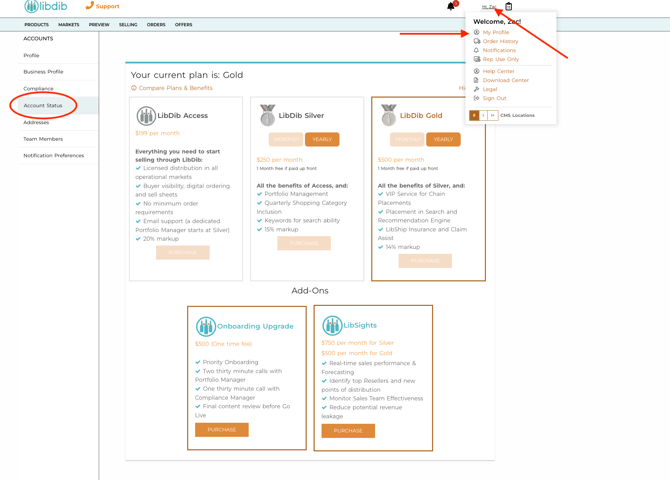
Every tier includes all available LibDib markets. Choose the level of support that fits your business.
|
Membership |
Monthly fee |
LibDib markup |
Best for |
|---|---|---|---|
|
LibDib Access |
$199 |
20% |
Makers who want self-service access to LibDib's distribution network and platform |
|
LibDib Silver |
$250 |
15% |
Makers who want Portfolio Manager support to grow in specialty accounts |
|
LibDib Gold |
$500 |
14% |
Makers pursuing chain accounts, inventory management and strategic growth planning |
For full benefit details, see What Are LibDib's Membership Plans?
Commitment and fees
Memberships are billed monthly. Gold and Silver are designed as growth programs and require a minimum three-month commitment.
- Membership fees are non-refundable.
- Your Membership fee does not change when LibDib adds new markets.
- State registration, licensing and permit costs for each market are separate from your Membership.
- Priority Onboarding and LibSights are optional add-ons, billed separately from your Membership.
Frequently asked questions
Do I need a separate Membership for each state? No. One Membership covers every available LibDib market.
LibDib just opened a new market. Do I need to upgrade or pay more? No. New markets are included in your current Membership at no additional Membership cost. You only need to complete that market's setup and compliance requirements.
Can I distribute through LibDib without a Membership? No. An active Membership is required for all Makers distributing through LibDib.
What happens if my Membership lapses? Your offerings will not be available for distribution through LibDib until your Membership is reactivated.
I was a LibDib+ member. What now? LibDib+ was retired on August 1, 2026. You will need to choose a new membership to continue being distributed by LibDib.
How do I sign up or change my Membership? Log into your LibDib account, go to your name on the top right, choose Profile from the menu, then on the left hand side of the screen, choose Account Status. Choose your Membership and you will be directed to our payment platform Stripe. Not sure which fits? Contact the LibDib Team or chat with Libby.
Related articles
- What Are LibDib's Membership Plans?
- Do I Need Multiple Memberships If I Have More Than One LibDib Account?
- LibDib Maker Onboarding Guide
- Does LibDib Help Us Gain Exposure?
Questions?
Contact your Portfolio Manager or email makers@libdib.com.