LibSights is a self-serve, real-time comprehensive sales and business intelligence tool offering suppliers clear visibility into brand performance. Via a series of LibSights custom dashboards, Makers are able to monitor key metrics, analyze customer engagement and identify growth opportunities.
Key Capabilities include:
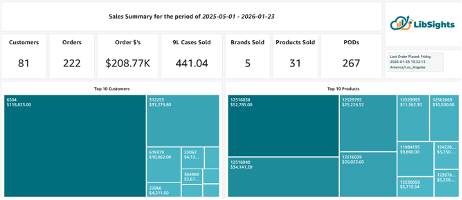
Sales Performance Tracking and Operational Insights
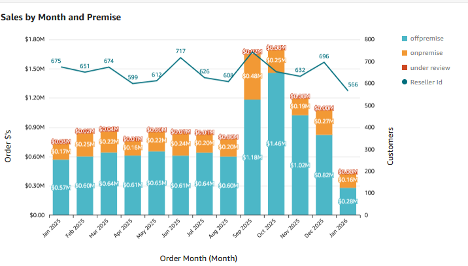
- Monitors KPIs, shows sales trends and provides comparative analysis across various metrics
- Depletion reports with detailed order information
- Comprehensive view across all products and distributors (requires depletion data from other distributors)
- Warehouse inventory hand counts
-
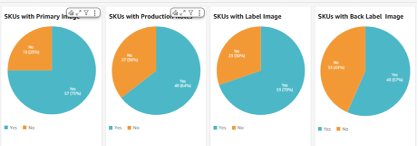
Digital asset tracking (product images, descriptions, brand information)
Customer Intelligence and Product Analysis
- Categorizes customers by buying behavior and identifies revenue leakage from "stale" buyers
- Provides product sales comparisons across resellers and time periods
- Identifies top-performing suppliers, brands, products and customers
Prospecting & Growth
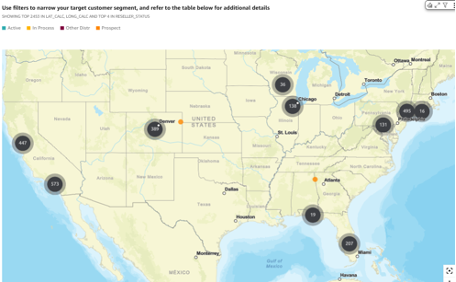
- Identifies active and potential customers with filters for targeting specific geographical or business segments
- Maps customer locations geographically
- Shows customer segments by size, status, licenses, and recent spending
- Provides contact information for outreach
How much does LibSights cost?
$500 USD per month for Gold
$750 USD per month for Silver
(more information about LibDib's Gold, Silver and other Membership programs can be found here).
Non Gold and Silver Members please inquire via Makers@libdib.com.
How do I sign up for LibSights?
- Log into your LibDib account, go to “MY PROFILE” on the upper right hand side.
- Click on “ACCOUNT STATUS” on the left hand side.
- Choose LibSights.
- You will be sent to a secure checkout page via our payment partner Stripe. Fill in the required information.
- A Portfolio Manager will reach out within one business day to get you started with customized LibSight dashboards.